
Elementor FAQ

- Elementor button element doesn't render shortcodes
The Elementor button element does not automatically render shortcodes in the “text” field.
If you wish to include an If-So shortcode within an Elementor button field to display dynamic text on the button, you can add the following code snippet to the end of your functions.php file.
//Elementor button - render shortcode in URL add_filter('elementor/widget/before_render_content',function($el){ if($el->get_name()==='button'){ $link_setting = $el->get_settings('link'); if(!empty($link_setting)){ $link_setting['url'] = do_shortcode($link_setting['url']); } $el->set_settings('link',$link_setting); } }); - Problem loading triggers with Ajax & Elementor
To prevent Elementor from escaping the output and hindering our triggers from rendering correctly in Ajax mode, you can add the following code to the website’s functions.php file:
add_filter( ‘elementor_pro/dynamic_tags/shortcode/should_escape’, ‘__return_false’ );
It’s important to note that Elementor intentionally restricts content rendering using Ajax with a dynamic shortcode for security reasons. Changing this setting doesn’t imply that your site becomes vulnerable to attacks by hackers who are not logged in.
- Fix: Elementor Videos Not Loading with Ajax
If your conditional Elementor video element isn’t loading with Ajax enabled in If-So, add this code snippet to the end of your theme’s functions.php file:
add_action('wp_enqueue_scripts',function(){ if(!function_exists('wp_add_inline_script')) return; wp_add_inline_script( 'if-so', " document.addEventListener('ifso_ajax_triggers_loaded',function(){ if(document.querySelectorAll('.elementor-video').length<=0) return; var initFrontendIfPossible = function(){if(typeof(YT)!=='undefined'){elementorFrontend.init();return true;}return false;} initFrontendIfPossible(); var interval = setInterval(function(){ if(initFrontendIfPossible()) clearInterval(interval); },1000) });"); },100); - Unwanted padding when element is not displayed
When you apply a condition on a text block in Elementor that has custom padding, only the text is hidden if the condition isn’t met—the padding remains visible. This happens because the condition affects the content inside the block, not the block’s structure itself.
One possible solution is to change the structure of the element so that another wrapper element receives the padding instead, if possible.
Or, the simpler option is to load CSS that sets the padding to zero when the condition is not met.
To do so:
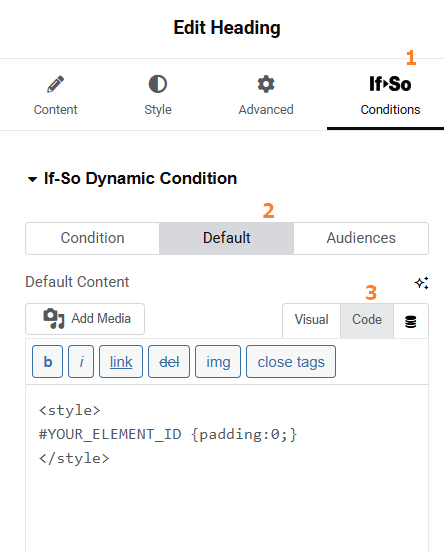
- Click the Conditional Element
- Click the Default Content tab
- Switch the content field to HTML mode
- Paste the following code into the content field:
<style>
#YOUR_ELEMENT_ID {padding:0;}
</style>
Make sure to replace YOUR_ELEMENT_ID with the ID of your element. You can either use the ID automatically generated by Elementor or assign one manually using Elementor’s CSS ID field.
More about CSS ID in Elementor (the official Elementor documentation)
