
Troubleshooting – The Geolocation Condition

If you have set up a geotargeted content and it doesn’t seem to be working as expected, follow the troubleshooting steps below. Each step covers a common issue and how to verify it.
1. Are you testing the site on a local server or internal environment?
The geolocation condition uses an external API to identify the visitor’s location. It can only work on a live, publicly accessible website. Local or internal environments do not support IP-to-location lookups.
2. Is there a communication issue between your server and ours?
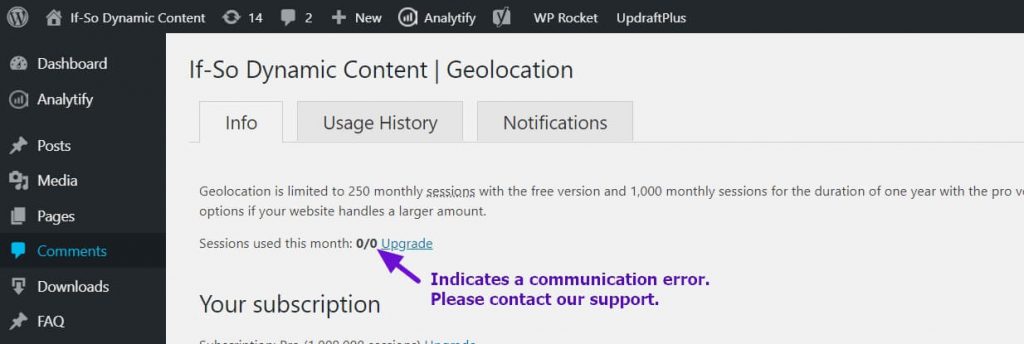
- In your WordPress dashboard, go to If-So → Geolocation.
- Look at the value next to “Sessions used this month.”
If it shows 0/0, it usually means your server cannot reach our geolocation service.
Please fill out this form and our support team will take it from there.
3. Are you testing the site using a VPN?
If-So’s geolocation condition may not take action when browsing the site through some VPNs. If you don’t see the geo-targeted version, it doesn’t necessarily mean the condition isn’t working properly.
Instead, try:
- Targeting your own actual country to verify the trigger – Set the condition to “Is” > {your country} to confirm the content displays correctly, or set it to “is not” > {your country} to verify that the fallback or default version appears.
- Here is the corrected and polished version:
- Try testing the page using an online proxy server or a different VPN. We use NordVPN for our testing.
4. Are you using a caching plugin or CDN?
Caching shows visitors a pre-rendered version of the page. If you use a caching plugin, server cache, CDN, or any type of page caching, enable If-So’s Page Caching Compatibility option to ensure your geotargeted content loads via Ajax after the cached page is served.
- Go to If-So → Settings.
- Enable the Page Caching Compatibility options
Elementor users:
In adittion to the steps above, go to Elementor → Settings → Performance (tab) → Change the Element Cache to Disable, and let me know if it solves the problem.
For a deeper explanation of page caching and If-So’s caching compatibility.
5. Is your location being detected inaccurately?
No IP-to-location service is 100%. The accuracy of a location depends on many factors, the most important being the ISP of the address. The accuracy is generally higher for fixed lines than it is for cellular networks. Learn more here about geolocation accuracy.
Below is how If-So recognizes your location. If you have set up a trigger targeting your actual location but the detected value is incorrect, the dynamic version will not be displayed as expected.
Continent:
Country:
State:
City:
Timezone:
Do you see the correct location in the above list?
✅ Yes → Double-check that your dynamic content is being loaded via Ajax (see the step above).
❌ No → Check out the three options below:
- Accuracy issues can be corrected within 24 hours – Fill out this form and we will ask our database provider to review and correct the IP record.
- If you are targeting users at the city level, consider using our HTML5 Geolocation API instead of, or in addition to, the IP-to-location service.
- Consider adding a Location Override Form to let users select their correct location manually.
6. Do you have enough geolocation session credits?
Unlike other If-So conditions, geolocation usage is limited by monthly sessions. If you run out of credits, the default content (fallback content) will be displayed instead of the geotargeted version.
To view your monthly session usage, go to If-So → Geolocation in your WordPress dashboard.
7. Are you using Cloudflare?
From time to time we encounter conflicts between our geolocation service and Cloudflare. We can solve them! Paste the following code at the end of your functions.php file and try again. If it doesn’t solve the problem, please contact our support.
add_filter('ifso_user_ip',function(){
$ip = null;
if (!empty($_SERVER['HTTP_CF_CONNECTING_IP']))      //Cloudflare
$ip = $_SERVER['HTTP_CF_CONNECTING_IP'];
elseif (!empty($_SERVER['HTTP_CLIENT_IP']))
$ip = $_SERVER['HTTP_CLIENT_IP'];
elseif (!empty($_SERVER['HTTP_X_FORWARDED_FOR']))
$ip = explode(',',$_SERVER['HTTP_X_FORWARDED_FOR'])[0];
else
$ip = $_SERVER['REMOTE_ADDR'];

if(!empty($ip)){
$ip = explode(':',$ip)[0];
}

return $ip;
});
None of the above solutions worked?
Please contact our support team and provide the following information:
- A screenshot of how you have set up the geo-targeted content (editing interface).
- A link to a live testing page where you have pasted the following content:
Country: [ifsoDKI type='geo' show='country' ajax=’yes’ fallback='']
State: [ifsoDKI type='geo' show='state' ajax=’yes’ fallback='']
City: [ifsoDKI type='geo' show='city' ajax=’yes’ fallback='']
Continent: [ifsoDKI type='geo' show='continent' ajax=’yes’ fallback='']
Related FAQs
The geolocation service is powered by an IP-to-location API. When a user visits a page with a geolocation condition or DKI shortcode for the first time during their session, a request is sent to the geolocation database to compare the user’s IP with the location information stored in the database. A geolocation session starts when a visitor first accesses a page with a geolocation trigger or a Geolocation DKI shortcode and lasts until the visitor closes their browser or has been inactive for 25 minutes (note that this time frame may vary slightly depending on the browser and server hosting the website). Not every page view should count as a session! If-So offers two options to help identify and block bots — we recommend using both. Click here to learn how to activate these options.What is a geolocation session?
Blocking IPs from the geolocation service