
Built-In A/B Testing Analytics
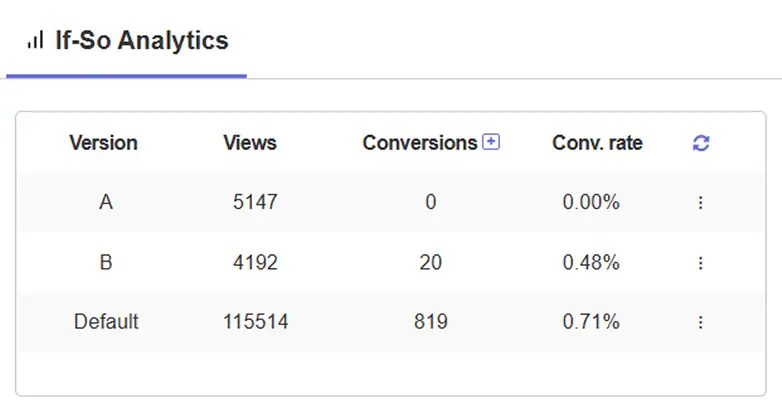
If-So tracks your A/B test results, conversion goals, and version performance directly inside WordPress.
No Google Analytics setup, no third-party scripts, no data leaving your site.
Define what a conversion means for your business, run your tests, and read your results — all from one dashboard.
Your Conversions, Your Rules
Create as many conversion goals as you need — a separate goal for every action that matters to your business. Trial signups, purchase confirmations, pricing page visits, or any other page a visitor reaching means something.
A conversion is recorded when a visitor reaches your target page after seeing a trigger.
Take It Further with Conditional Conversions
For cases where URL-based tracking isn’t granular enough, place a conversion event inside any If-So trigger.
This lets you count a conversion only when a specific condition is met — useful for tracking actions that depend on who the visitor is, not just which page they reached.
No Extra Tools Required
Most A/B testing setups require a separate analytics platform. You connect your testing tool to Google Analytics, configure goals, wait for data to sync, and cross-reference results across two dashboards.
If-So works differently. Conversion tracking is built directly into the plugin — every test you run, every goal you define, and every result you read lives in the same place you built the test.
Clear and Simple — Two Ways to View Your Results
The analytics dashboard gives you 2 report views, each designed to answer a different question.
Conversion View
Start with a goal and see which triggers are driving it.
Each conversion is a section header — below it, every relevant trigger appears with a version-by-version breakdown showing views, conversions, and conversion rate.
Use this when you want to understand what’s contributing to a specific outcome: “Which of my tests is driving the most free trial signups?”
Trigger View
Start with a trigger and see how it performs across all your goals simultaneously.
Each trigger is a section header with all your conversion goals shown as side-by-side columns — one row per version.
Use this when you want to evaluate one specific test against multiple outcomes: “How is my hero A/B test performing against both trial signups and pricing page visits?”
Built for A/B Testing
Running a clean A/B test means more than showing two versions — you need data you can trust.
Unique views
Toggle between total views and unique views. When unique views is selected, a visitor who sees the same version multiple times due to recurrence settings counts as 1 view — not 3.
For A/B testing, unique views gives you the cleaner picture: how many distinct visitors saw each version.
Version names in reports
Every version you name in the trigger editor — “Blue CTA,” “Short Headline,” “With Social Proof” — appears directly in your analytics reports. Name your versions before your test runs and your data is readable at a glance.
Attribution
Conversion credit goes to the last version a visitor saw before reaching the conversion URL, within the same browser session. If a visitor was part of multiple active tests, each relevant trigger receives attribution — one version credited per trigger.
Frequently Asked Questions
Is the analytics dashboard included in the free version?
Yes — free users can create 1 conversion goal and view up to 30 days of data. The Pro plan unlocks multiple conversion goals and full data history, letting you track different actions simultaneously and compare results across goals in the same report.
Do I need Google Analytics to use this?
No. If-So’s analytics are fully self-contained. You can run A/B tests and track conversion results entirely within your WordPress dashboard, with no Google Analytics account or setup required.
Can I track multiple conversion goals at the same time?
Yes. Create as many conversion goals as you need and track them simultaneously. In Trigger View, all your goals appear as columns side by side so you can evaluate one trigger against multiple outcomes in a single view.
Can I track conversions for personalization triggers, not just A/B tests?
Yes. Conversion tracking works across all If-So triggers — personalization, geolocation, and A/B testing. Any trigger can be connected to any conversion goal.
How does conversion attribution work?
Attribution is last-touch within a session. The most recent trigger version a visitor saw before reaching the conversion URL receives the credit.
If a visitor was exposed to multiple triggers in the same session, each trigger receives attribution for the version that was shown.