
Billing and Payments FAQ

- PayPal checkout doesn’t work (Alternative method)
Checkout issues may occur due to PayPal limitations in certain countries or with specific credit card.
In addition to PayPal checkout, we also offer an alternative purchase option via Freemius. If you’re unable to complete checkout through PayPal, you can use one of the links below to subscribe directly.
After the subscription is completed, we’ll manually set up your account and license and make sure everything is properly activated.
Pro Plans
Geolocation Plans
Geo Basic – 10K Monthly Sessions – Annual or Monthly
- Features Availability Table
Trigger Gutenberg Elementor CSV DKI Options Built-in Analytics V Recurrence V Conditions Device type V V V Logged in users V V V Start & end date V V Geolocation V V V V V User IP V V V V UTM parameters V V V Browser language V V V Google Ads V V V V Facebook Ads V V V Referrer source V V V V V Dynamic links V V V V V Scheduling V V First-time visitors V V V Returning visitors V V V Pages visited V V V Page URL V V V V Post category V V V User Role V V V Audiences V V V V Extensions Trigger events V Custom user profile fields V Audience self-selction Conditional Countdowns V Browser Type, Operating System, and User Agent V Day of The Month V Number of Version Views V Integrations WooCommerce V V V V Memberships & Subscriptions V ActiveCampaign V WishList Member V MemberPress V Restrict Content Pro V Paid Memberships Pro V AffiliateWP V Easy Digital Downloads V Weglot V WPML V LearnDash V WP Courseware V MasterStudy V LearnPress V Tutor-LMS V WP Job Manager V ACF V - Do I need a Pro If-So License to use the geolocation service?
No! If you only want to use geolocation-based conditions, you can use a Geolocation plan on its own, without purchasing the Pro plan.
If-So offers two types of plans:
- Free plan – Includes up to 250 monthly geolocation sessions. Available via the WordPress plugin directory. The free option is powered by the same premium IP-to-location database used by the paid plans.
- Pro plans – Includes unlimited access to all conditions and features, plus up to 1,000 monthly geolocation sessions.
- Geolocation plans – Designed for users who only need the geolocation service, or for Pro users who need more than the 1,000 geolocation sessions included in the Pro plan.
- Can a single geo license be used on multiple websites?
Absolutely! There are no limits on the number of domains on which you can activate a geolocation license.
- Does every page view count as a session?
Certainly not!
- A session is only counted when a user visits a page that contains location-based content, such as a trigger with a geolocation condition or a Geolocation DKI shortcode.
- If-So tracks the browser session throughout the user’s visit, so if the user navigates through multiple pages within the same visit, only one session will be counted.
Will a session be counted in the event that the geolocation condition is not met?
Yes. To determine the user’s location for deciding whether to display geotargeted content, we need to check the user’s location. As a result, a session will be counted irrespective of whether the geotargeting condition is met or not.
- Can I upgrade my geolocation plan later?
Absolutely!
Both Geolocation and Pro plans can be upgraded at any time.
The upgrade price is prorated based on the remaining time in your subscription, so you only pay the difference between plans.
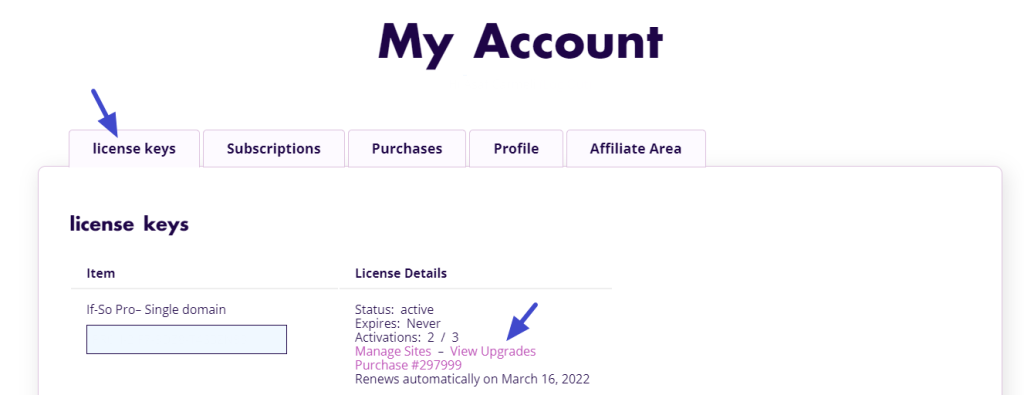
To upgrade your plan:
- Log in to your If-So account.
- Go to the License Keys section and click View licenses.
- Click View upgrades next to the relevant license.
- Choose the plan you want and click Upgrade license.
License upgrade - What is a geo session and how is it counted?
If-So is designed to keep session usage as low as possible.
A geolocation session represents a visitor whose location is checked in order to display location-based content.
- A single visitor is counted as one geolocation session per visit, even when browsing multiple pages.
- A session begins when a page with a geolocation condition is accessed and ends after the visitor leaves or is inactive (typically around 25 minutes).
- Sessions are counted only when geolocation is required. Pages without geolocation conditions do not consume sessions.
The table below shows how different visitor actions affect the session count:
Scenario Session Count A visitor only views pages without geotargeted content and then leaves 0 A visitor views a page with conditional content, the geolocation condition is not one of the conditions (other If-So conditions are used). 0 A visitor browses multiple pages within a single session 1 A visitor visits a page with geotargeted content, and then refreshes the page 1 A visitor views a page, closes the tab, and returns to the site after 15 minutes 1 A visitor views a page with geotargeted content, but their location doesn’t match any targeted locations (default content is shown).
*The user’s location still needs to be checked in this case.1 !
Does your geolocation session count seem inaccurate?
This is most often caused by bots visiting your site and consuming sessions. Learn how to reduce bot-related session usage.
- What happens when I reach my geo session limit?
When your geolocation sessions are depleted, If-So simply skips the geolocation condition and continues evaluating the next content version in order.
For conditional content (triggers, conditional Elementor elements, or Gutenberg blocks), if all dynamic versions rely on geolocation or no conditions are met, the default content is shown. Your site continues to work normally.
For Geolocation DKI shortcodes, you can define a fallback value to display when geolocation is unavailable.
This ensures a consistent experience even when geolocation data isn’t available.
- Can I prevent logged-in users from consuming geo sessions?
Yes. You can exclude logged-in users from using geolocation sessions by adding a small snippet to your site.
Add the following code to your functions.php file:
add_filter('ifso_exclude_from_geo', function($exclude) { if (is_user_logged_in()) { $exclude['blockme'] = true; } return $exclude; });This helps reduce unnecessary session usage and ensures geolocation sessions are used only for relevant visitors.
- Where can I view my geo session quota and usage?
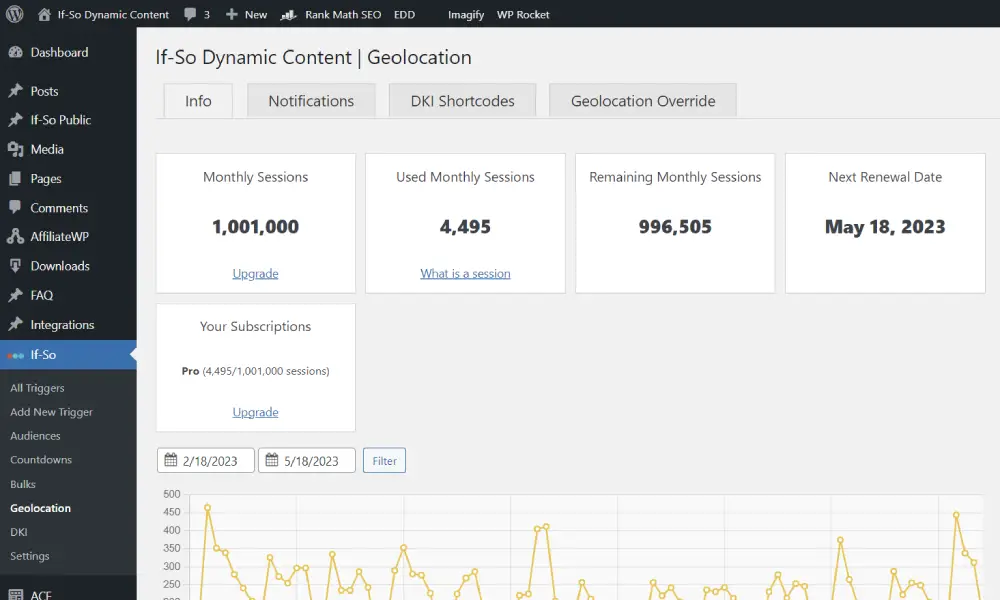
You can view your monthly geolocation session quota and usage in two places:
- In your WordPress dashboard: go to If-So → Geolocation, where you can see your current usage and quota directly in the admin area.
- In your If-So account: log in to your account, open the License Keys section, and view the details of the relevant license to see usage and limits.
Screenshot – The geolocation dashboard 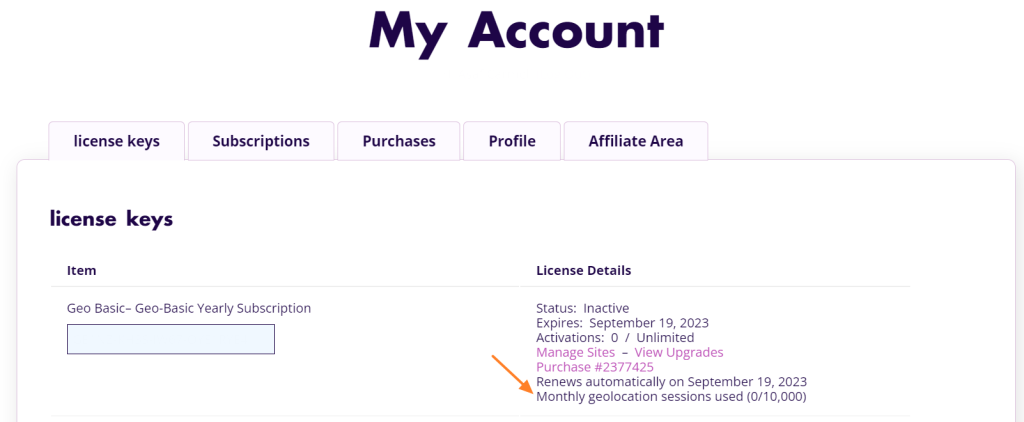
Screenshot – Your account - Can I use If-So on a WordPress multisite?
Yes, you can.
Each subsite will require its own license.
If-So cannot be network-activated. The license will have to be activated separately on each subsite.
- Is Elementor integration available in the free version?
Yes, it does.
Yes, it does. All the functionality and conditions included in the free version will also work with the Elementor integration (click here for a list of the free vs. pro features).
- Can you explain the different plans?
We provide two types of licenses: Pro and Geolocation.
- Pro License: Grants you UNLIMITED ACCESS to all conditions and features, except for the geolocation condition, which is limited to 1,000 monthly sessions. A Pro license is NOT REQUIRED if you solely need the geolocation functionality.
- Geolocation License: If you’re exclusively interested in the geolocation service or if your website requires additional geolocation sessions beyond what is included in the Pro license.
- Pro License: Grants you UNLIMITED ACCESS to all conditions and features, except for the geolocation condition, which is limited to 1,000 monthly sessions. A Pro license is NOT REQUIRED if you solely need the geolocation functionality.
- Am I limited by monthly sessions?
No. The only condition limited by monthly sessions is the geolocation condition for which we use a premium IP-to-Location database in order to match the user’s IP to their location.
If you’re exclusively interested in the geolocation service or if your website requires additional geolocation sessions beyond what is included in the Pro license you can subscribe to one of our geolocation plans.
- Can licenses be transferred between sites?
Yes, you have the flexibility to deactivate a license on one site and activate it on another as many times as needed.
- Can a license be used in staging and live?
Each WordPress installation is considered a separate domain. However, you can deactivate a license key in one environment and activate it in another environment as many times as necessary.
- Which payment methods are accepted?
We use PayPal’s secure system to accept both direct PayPal payments and all major Credit Cards (no PayPal account required). If you are located in a region not supported by PayPal, or if your card is rejected, we also offer a secure checkout via Freemius.
- How can I pay with a credit/debit card?
To make a payment with a debit or credit card without creating a PayPal account:
- On the checkout page, click the ‘Debit or Credit Card’ button.
- Fill in your details.
- Toggle off the ‘Save info & create your PayPal account’ button.
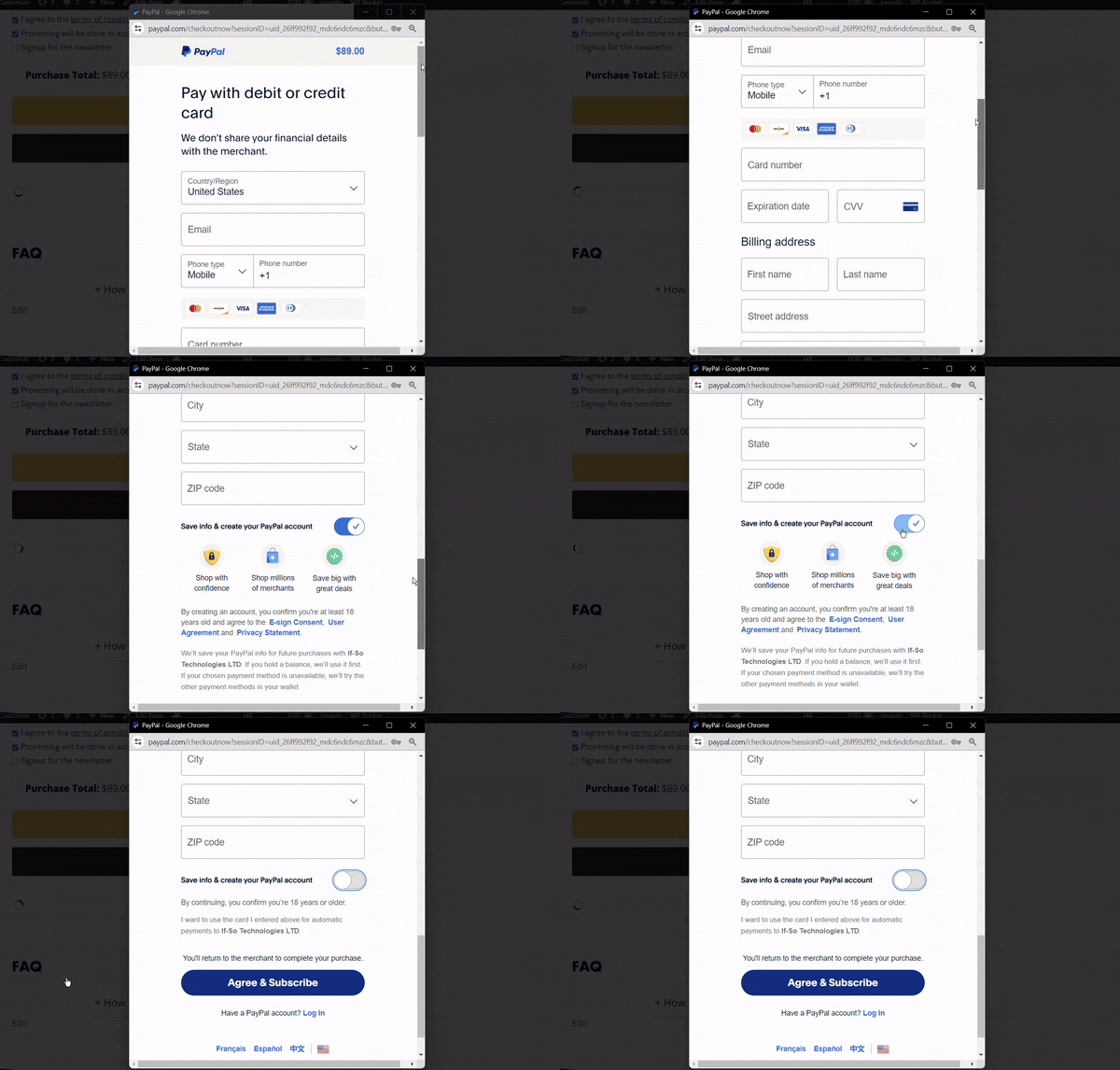
- Proceed with the checkout process.
Still facing issues? ask a pre-sale question.
- Is a separate license key required for a Multisite WordPress installation?
In a Multisite WordPress installation, each sub-site requires its own separate license key for activation. Each license activation is counted individually in regard to the license activation limit.
- Can I upgrade an existing plan?
Yes, you can upgrade an existing license at any time. Learn how.
- How can I renew an expired license?
Due to technical limitations with the third-party service we use to manage license keys, renewing an expired subscription isn’t currently possible. The simplest solution is to create a new subscription.
To create a new subscription, please follow these steps:
1. Log in to your account
Click here to log in.2. Choose a new plan
Once logged in, visit our pro plans page, or our geolocation plans page and select the relevant plan.3. Activate your new license
Once you complete the purchase, go to If-So > License in your WordPress dashboard and replace the old license key with the new one. - How can I update my credit card information for billing
We employ PayPal for secure payment processing, which means we do not store any credit card details on our site.
If you used a PayPal account for your purchase, you can conveniently update your credit card information by following the steps to replace the card on your PayPal account (how to update your credit card in PayPal).
If you made a direct payment with a credit card without logging in to your PayPal account, unfortunately, the only available solution would be to create a new subscription. Please contact our support team if this is the case.
- Does If-So work on a subscription basis?
Yes. License keys are subscription-based and will automatically renew on a yearly basis, giving you access to support and important updates.
If you decide to cancel your subscription, you will still be able to use all the pro features – they will keep working forever, but you will no longer receive updates or support once the license key expires.
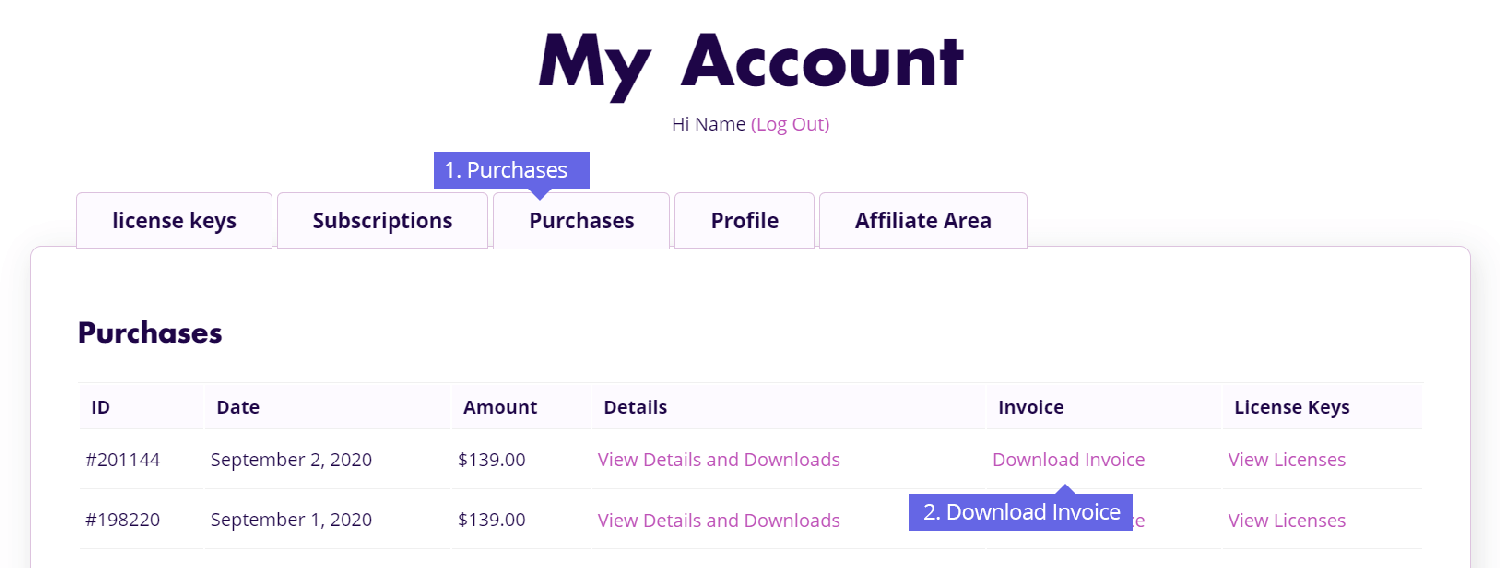
- How can I download invoices/update billing?
Invoices of your purchases can be downloaded from your Account area.
- Log in to your account. Your user name is the email you used during signup.
- Click the Purchases tab (or the Subscription tab if you are interested in an invoice for a renewal payment).
- Find the relevant order and click View Invoice
- Click “Update” if you want to update your billing details
- Print or download the Invoice as PDF
- Why is my license status showing as "Inactive"?
The “Inactive” status indicates that the license is valid but has not been activated on any site yet.
- How Can I Cancel My Subscription
You can cancel your subscription at any time. To cancel your subscription:
- Log in to your account (the user name is the email you used during checkout).
- Click the “Subscriptions” tab.
- Next to the subscription you wish to cancel, click “Cancel”