

The ‘Show Post’ shortcode: design dynamic content using your page builder
The Show Post shortcode lets you create and design dynamic content using your preferred page builder, then load that content directly inside an If-So trigger.
This method gives you full creative control over the layout – Elementor, Gutenberg, Divi, or any other builder – while still benefiting from If-So’s conditional logic.
Simply design the content on a dedicated page, insert the shortcode into the trigger, and If-So will display the correct version to each visitor based on your conditions.
The Show Post shortcode
The Show Post shortcode provides a simple way to pull content or titles from any post or page and display them wherever you need. Its default behavior is to output the post’s content, and with a single parameter, you can switch it to display the post’s title instead.
Display the post content:
[ifso-show-post id="123"]Display the post title:
[ifso-show-post id="123" show="title"]Step- by-step: How to get your post or page ID?
- Create the content you want to display as dynamic content on a new page.
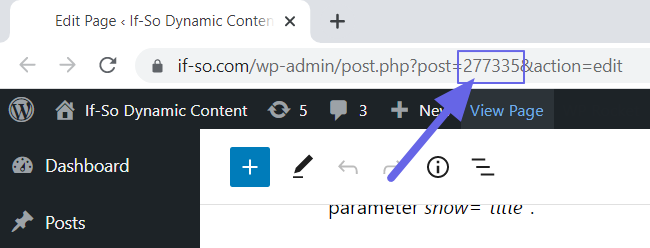
- Publish the page. While still on the edit screen, look at the browser’s address bar and locate the post ID in the URL.
- Create a new trigger and paste the Show Post shortcode into the version’s content field. Make sure to replace the post ID value (123 in the example) with the actual ID of your post.
[ifso-show-post id="123"]- Publish the trigger, then paste the trigger’s shortcode on the page where you want to display the dynamic content.
The post ID is placed between “post =” and “&”.

Elementor Users
Add the parameter type=”elementor” to ensure adequate loading of all elements. For example:
[ifso-show-post id="123" type="elementor"]
Divi Users
Add the parameter type=”divi“ to ensure adequate loading of all modules. For example:
[ifso-show-post id="123" type="divi"]
WPBakery Users
Add the parameter type=”WPB” to ensure adequate loading of all elements. For example:
[ifso-show-post id="123" type="WPB"]