
WooCommerce DKI
Use WooCommerce DKI shortcodes to display real-time values directly inside your content.
For example:
- “You currently have 3 items in your cart – add 1 more to get a discount.”
- “Your cart total is $84 – spend $16 more to unlock free shipping.”
- “This offer is available to customers in California.”
- “You last purchased this product on March 2, 2026.”
Use cases
- Show the number of items in the cart inside a promotional message
- Display the cart total to encourage users to spend a little more
- Insert the customer’s billing or shipping country into personalized content
- Show the last purchase date of a product in a follow-up offer
- Combine dynamic WooCommerce values with If-So conditions for more personalized content
Available shortcodes
Shipping / Billing address
Display details from the customer’s shipping or billing address.
[IfsoWCDKI type='shipping-address' show='country']‘type’ parameter values: shipping-address, billing-address
‘show’ parameter values: country, state, city, postcode, name, FirstName, LastName
Value / Number of items in cart
Display the number of items currently in the cart.
[IfsoWCDKI type='cart' show='number']‘show’ parameter values: number, value
Product last purchase date
Display the last purchase date of a selected product.
[IfsoWCDKI type='product-last-purchased-date' item_id='XXX']Replace XXX with the relevant product ID.
This shortcode is commonly used with countdown timers to create time-limited offers after a purchase.
Replace product button
Displaying a “Replace Product” button. Learn more.
[ifsoWC type='replace-product-button' add='123' remove='234' amount='2' submit='BTN TEXT' reload='yes' ajax='yes']Troubleshooting
- Enable shortcodes in WooCommerce Product Attribute Fields
WooCommerce product attribute fields don’t render shortcodes by default. To display If-So shortcodes within these fields, add the following code snippet to the end of your theme’s functions.php file:
add_filter('woocommerce_attribute',function($a){ return do_shortcode(wp_specialchars_decode($a,ENT_QUOTES)); });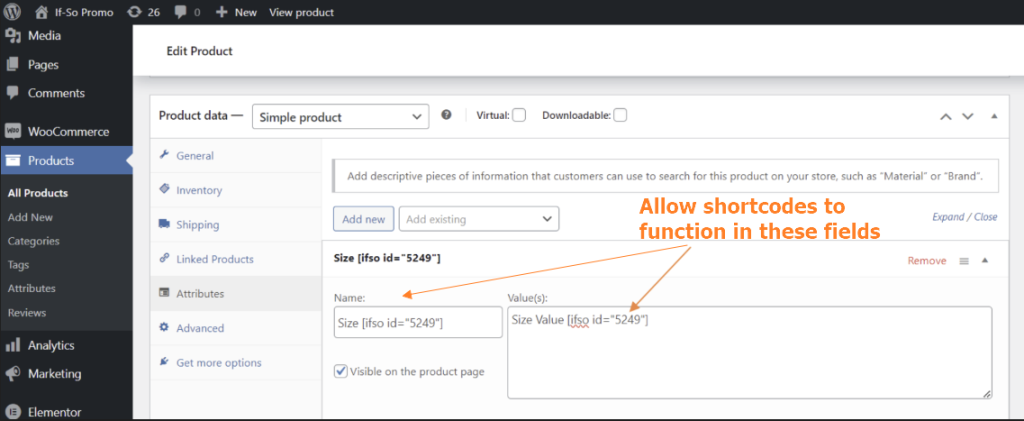

Didn’t find what you need?
If-So & WooCommerce Integration
Price: FreeRequirements: If-So Pro