Case Study: Audience-targeted Content – Sitewide

Company: Carbs & Cals

Industry: Healthcare | carbsandcals.com | London, United Kingdom

Features Used: Audiences, User Self-Selection Form

At a glance

Carbs & Cals, a health and nutrition platform, implemented an audience self-selection form in the main menu, allowing visitors to choose their primary interest at any time. Once selected, the website remembers that choice and dynamically adapts content throughout the site.

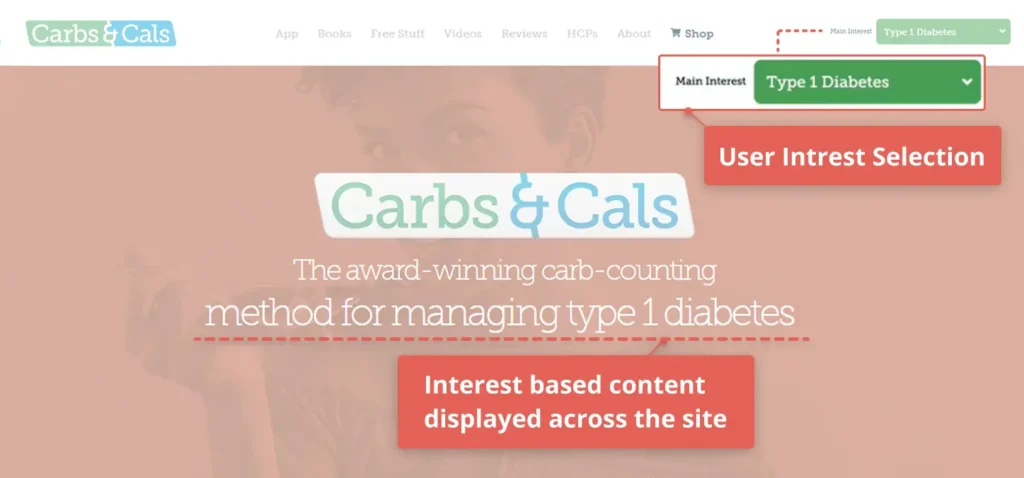
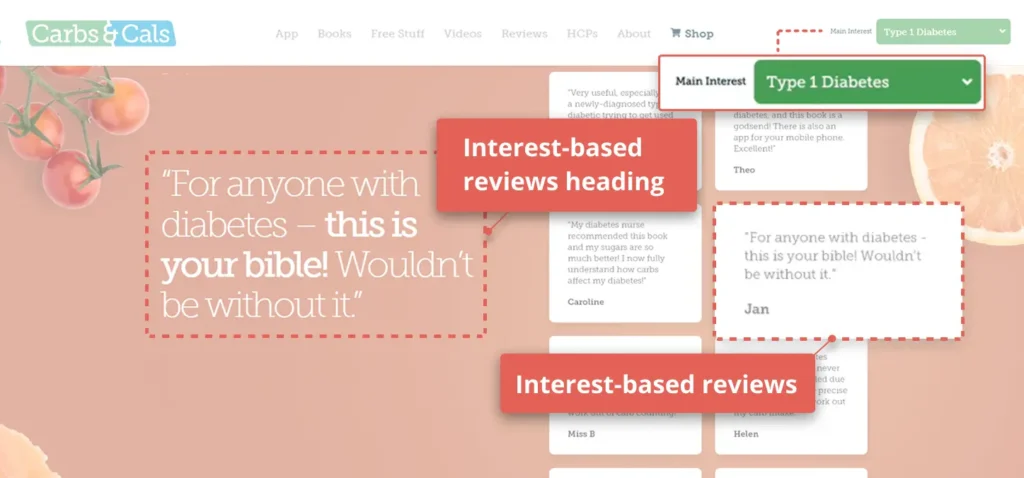
When ‘Type 1 Diabetes’ is selected, headlines focus on taking control of diabetes and counting carbohydrates. Product messaging highlights carb tracking and blood glucose management, and testimonials reflect diabetes-specific experiences.

Carbscals Type 1 diabetes 3
Interest (Audience) selection field and interest-based content in the homepage hero section

The Challenge: A single website for six different audiences

Carbs & Cals is a health and nutrition platform that serves multiple audiences, including Type 1 diabetes, Type 2 diabetes, gestational diabetes, weight loss, healthy eating, and healthcare professionals. Each group has different goals and requires different terminology and benefit-driven messaging.

Presenting the same products and services to all audiences within a single website created a messaging gap. Each audience interprets the products differently, and the benefits must be framed in a way that aligns with their specific goals and terminology.

To create a more relevant experience, Carbs & Cals set out to guide each visitor toward content that reflects their primary interest, so that product messaging, positioning, and customer reviews all speak clearly and specifically to the selected audience.

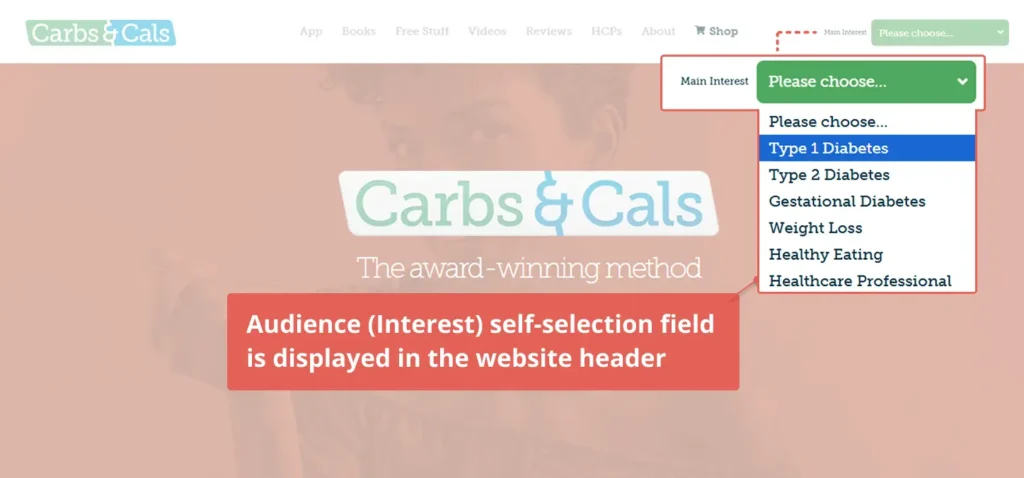
Audience self selection field 1
Audience (Interest) self-selection field is displayed in the header
interest based reviews 2
Interest-based reviews

Default view

When no specific intrest is selected, the default Healthy Eating experience is displayed, the messaging shifts to general nutrition guidance, balanced food choices, and broader lifestyle benefits.

The same pages, products, and structure remain in place – but headlines, benefit positioning, terminology, and customer testimonials dynamically shift to match the selected audience.

Carbscals Default 2
Default content – if no interest is selected
default reviews 1
Default reviews – if no interest is selected

The result

Instead of maintaining multiple versions of their website, Carbs & Cals now operates a single dynamic site that communicates differently based on each visitor’s selected interest.

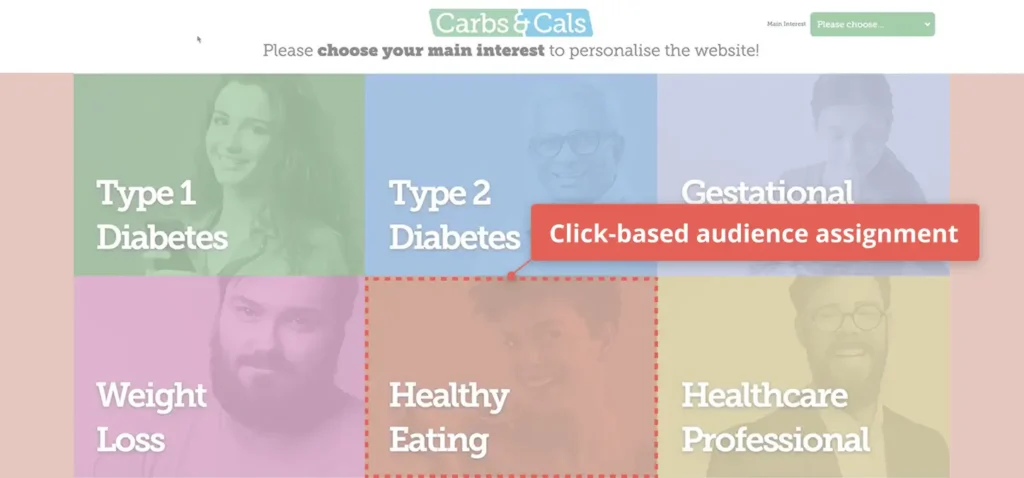
carbcals choose main interest 1
Click-based audience assignment

By presenting products in the most relevant context for each audience, the site immediately speaks to the visitor’s goals. This audience-specific experience increases engagement, encourages users to spend more time interacting with the content, and makes them more likely to download the app’s free trial or purchase a book.

Dynamic content enables Carbs & Cals to drive stronger user alignment from the first interaction through to product exploration and conversion.

Why We Chose IPinfo for IP-to-Location Data in Website Personalization

At If-So, our customers rely on us to deliver experiences that feel locally relevant the moment a page loads, whether that means the right language, the right offer, or the right regional message. That makes location data a foundational dependency.

Like many teams, we were aware of the common concern that “IP geolocation is inaccurate.” In fact, we experienced the limitations firsthand. As adoption of our geolocation features increased, inaccuracies, especially at the city level, began creating customer friction and limiting our ability to scale confidently.Rather than accept those constraints, we rigorously evaluated alternative providers to understand what truly drives reliable geolocation for real-world personalization. This post shares what we learned and why IPinfo ultimately became the foundation for our location-based experiences.

What Website Personalization Needs from Location Data

Effective personalization does not require GPS-level precision. What it needs is location data that is accurate and useful in production environments.

In most website personalization scenarios, location operates at three practical levels:

  • Country
  • Region/state
  • City

The right level depends on the rule being triggered. For example:

  • Geo-based headline swaps
  • Regional promotions and offers
  • Language or currency defaults
  • Store locator pre-selection

In each case, the goal is not pinpoint accuracy down to a street address. The goal is to reliably place visitors in the correct geographic bucket so personalization rules behave predictably.

Where IP Geolocation Can Go Wrong

Before switching providers, we experienced how even small inaccuracies in location data can impact websites.

When IP data is inconsistent, personalization breaks in visible ways:

  • Visitors see messaging for the wrong city or state
  • Language or currency defaults feel incorrect
  • Shipping or legal notices appear in the wrong regions
  • Regional promotions misfire

As adoption of our geolocation feature grew, we began noticing occasional inconsistencies, especially with city-level detection. It became clear that even small variations in data accuracy can influence user experience and campaign results.

Ultimately, geolocation quality contributes directly to how seamless and effective your dynamic content feels.

Why IP Location Can Look Inconsistent

Even strong geolocation systems must handle real-world internet complexity. Through our evaluation process, we found several structural reasons why IP location can vary.

Mobile Networks and Shared IPs

Mobile carriers frequently use CGNAT (Carrier-Grade NAT), which places many users behind a single public IP address. As a result:

  • Large numbers of users can appear to originate from the same network location
  • Traffic patterns can look geographically “jumpy”
  • Apparent user density can be misleading

For personalization systems like ours, this means city targeting must be supported by data that properly accounts for mobile network behavior.

VPNs, Proxies, and Privacy Tools

Privacy technologies intentionally abstract user location, which introduces legitimate uncertainty.

For personalization use cases, this is usually an uncertainty management problem, not a fraud problem. The key is working with a provider that surfaces reliable signals and confidence indicators so rules can adapt appropriately.

Some relay-based privacy systems, like Apple’s iCloud Private Relay, can still present stable regional signals, while others provide a completely different location. Understanding this distinction is important when designing resilient targeting logic.

IP Reassignment and Movement Over Time

IP addresses are not static assets. Networks evolve constantly:

  • IP blocks change ownership
  • Infrastructure gets reconfigured
  • Routing patterns shift
  • ISPs recycle address space

With our previous provider, we saw how static or slowly updated databases can degrade over time. Personalization rules that initially worked well became less reliable months later.

Fresh, continuously validated data turned out to be essential for long-term stability.

What We Looked for in a Geolocation Provider

When we set out to evaluate a new provider, we approached the decision from a product and customer experience perspective.

We prioritized:

  • Accuracy and consistency, especially at the city level
  • Transparency into confidence, not blind certainty
  • Frequent updates and data freshness
  • Fast, reliable API performance at WordPress scale
  • Responsive support for data corrections

To validate our decision, we ran our own benchmarking tests across multiple providers, measuring city-level accuracy within a 50 km radius.

The results were decisive.

IPinfo achieved 82% accuracy within 50 km, compared to 50% from our previous provider, which was a 32-point improvement. That level of difference directly addressed the customer complaints we had been seeing.

How IPinfo Approaches Geolocation Accuracy

What stood out to us about IPinfo was not just the raw accuracy improvement, but the methodology behind it. Their approach combines multiple signals, active measurement, and continuous validation.

Measurement Signals from ProbeNet

A key differentiator is ProbeNet, IPinfo’s internet measurement platform, which observes network behavior from globally distributed points of presence.

In practical terms, this means IPinfo is not relying solely on registry or WHOIS-style data. They are continuously measuring real-world network conditions.

For If-So, this translated into:

  • Fewer unexpected location shifts
  • Better city-level stability
  • Reduced long-term data drift

Freshness: Continuous Updates and Corrections

Data freshness became one of the most important factors in our evaluation.

Because IP infrastructure changes constantly, continuous updates help prevent the slow degradation that breaks targeting rules over time.

Since switching to IPinfo, we have seen a near-elimination of location accuracy complaints, which strongly validates the importance of ongoing data maintenance.

Built for Real Products

Beyond the data itself, IPinfo demonstrated strong operational reliability:

  • Easy API integration into our WordPress plugin
  • Stable performance at scale
  • Fast support turnaround (often well under 48 hours)
  • Production-ready documentation

Our integration process required minimal developer time, which allowed us to move quickly.

Practical Personalization Use Cases Powered by IP Location

With more reliable location data, we have been able to confidently expand our geotargeting capabilities across our platform. Today, customers use If-So with IPinfo to power:

  • Location-based banners and promotions
  • Localized testimonials and case studies
  • Regional pricing and shipping defaults
  • Store locator pre-selection
  • Timezone-based content scheduling
  • Dynamic Keyword Insertion (DKI) by geography
  • Lead routing and support assignment by region

As confidence in the data improved, these features moved from experimental add-ons to core personalization workflows.

Better Personalization Starts with Better Location Methodology

Our experience confirmed something important: many frustrations with IP geolocation stem from outdated, static data approaches rather than inherent limitations of the technology itself.

Before adopting IPinfo, accuracy issues created customer friction and limited our ability to scale geolocation as a core offering. After switching, we saw a measurable improvement in accuracy, a sharp drop in complaints, and the confidence to expand location-based personalization across our platform.

Today, geolocation drives more than 50% of our sales, and our API usage has almost doubled every year since 2021.

For If-So, better personalization truly started with better location methodology, and IPinfo provided the reliability we needed to make geolocation a cornerstone of our product experience.


Case Study: The Proximity Bridge – Converting Local Web Traffic into Physical Visits

Company: Center for a Humane Economy

Sector: Nonprofit | centerforahumaneeconomy.org | United States

Features Used: Geolocation, Geo-based Content

At a glance

The Center for a Humane Economy is a nonprofit organization focused on animal welfare and promoting ethical public policy, with both global and local audiences visiting its website.

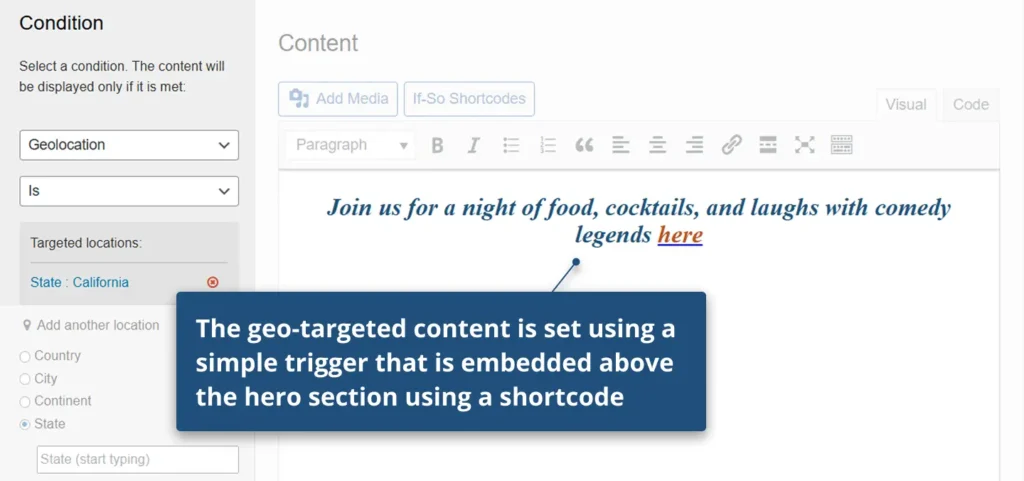
By adding a geotargeted message for nearby visitors, an announcement is displayed above the hero section only to users in California, inviting them to a local event, while remaining hidden from visitors in other locations.

dynamic annoucment bar use case 2
An event invitation displayed above the hero section – exclusively to visitors in California

The Challenge: Promoting a local event without affecting the homepage experience for other visitors

The Center for a Humane Economy created a local fundraising event in California and wanted to promote it on their website only to visitors in California, ensuring high relevance without reducing clarity for others.

Showing the event invitation to all visitors would introduce unnecessary distractions for users outside California, who are not relevant to this local event, and could divert attention from the page’s primary calls-to-action.

default state use case 1
Default state – no invitation shown

How Center for a Humane Economy used If-So

The solution was implemented using an If-So trigger with a geolocation condition targeting visitors in California. 

The geo targeted content is set using a simple trigger
The geo-targeted content is set using a simple trigger

Within the trigger, they created a content version containing the event announcement – “Join us for a night of food, cocktails, and laughs with comedy legends” – along with a clear call-to-action. The trigger was then embedded above the hero section on the homepage using a shortcode, ensuring the message was displayed only to visitors who met the location condition.

a simple shortcode
The trigger is embedded using a simple shortcode

The result

The event invitation was shown only to visitors in California, reaching a highly relevant audience while keeping the homepage clean for everyone else.

The setup took only minutes, required no coding, and was implemented without changing the existing website structure.

Case Study: Local Inventory Pop-up – Directing Users to Nearby Rentals

Company: Big Trailer Rentals

Industry: Trailers Rental | bigtrailerrentals.com | United States

Features Used: Geolocation, Geo Pop-up, Geo DKI

At a glance

Big Trailer Rentals is a nationwide rental platform that provides local trailer listings across multiple cities and states throughout the US.

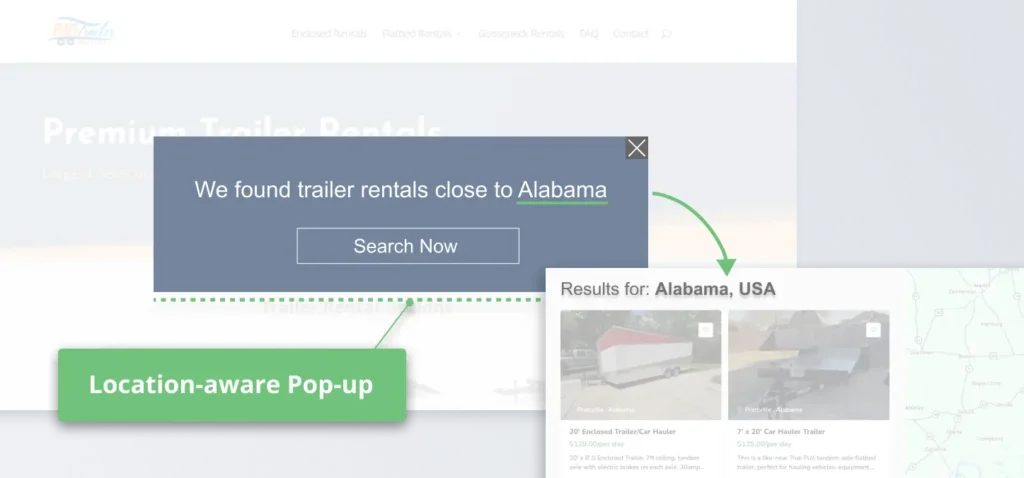
When visitors arrive on the site, a location-aware pop-up identifies their location, allowing them to skip the global catalog and jump directly to inventory available in their area.

By filtering out irrelevant inventory from the first click, the site reduces bounce rates and increases the likelihood of conversion by presenting only locally relevant, high-intent options.

Location Aware Popup 5
Location-aware pop-up: The “Search Now” button leads to localized search results.

The Challenge: Simplifying location-based experiences across multiple regions

Since availability varies by location, not all trailers shown on the site are relevant to every visitor. Without clearly surfacing location-specific availability from the start, visitors are exposed to options that don’t apply to them.

The goal was to introduce a simple, automatic way to recognize each visitor’s location and guide them directly to the most relevant trailers from the very first interaction – creating a more targeted experience and improving conversion potential.

How Big Trailer Rentals used If-So

Big Trailer Rentals used If-So to create a geolocation-based trigger targeting visitors from specific locations across the US where trailer rentals are available.

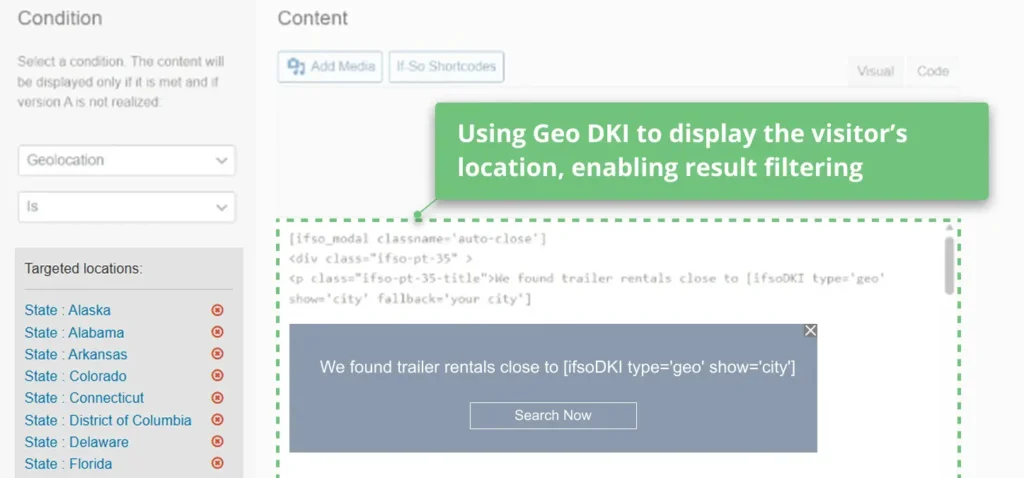
They implemented a location-aware pop-up that appears on page load, ensuring the message is delivered at the very first interaction. The pop-up uses Geo DKI to dynamically insert each visitor’s location into both the message and the call-to-action.

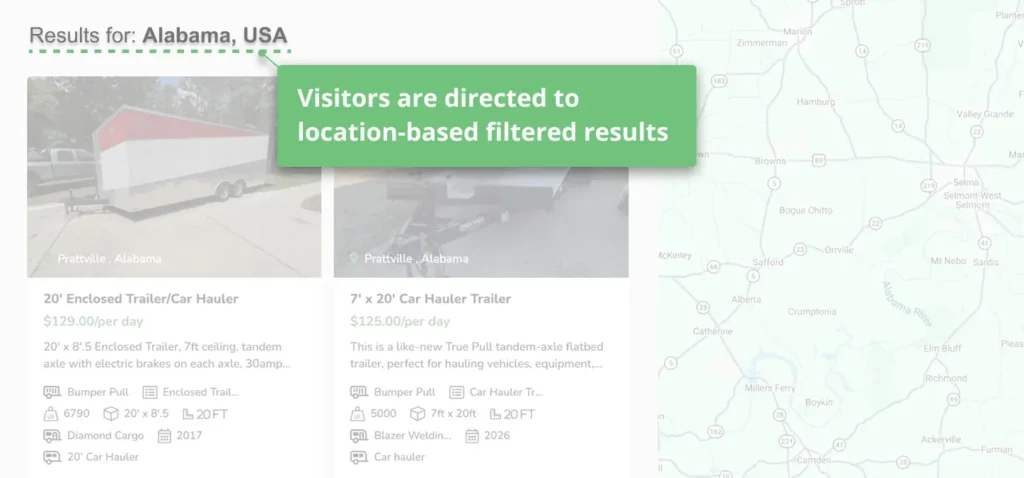
The call-to-action directs users to a results page with location-based filtering applied automatically, using dynamic URL parameters that adjust based on the visitor’s location.

This helps users quickly access trailers and equipment available in their area.

pop up set up big trailer rentals
Pop-up setup using Geo DKI
Location based filtered results 1
Visitors are directed to location-based filtered results

The result

Big Trailer Rentals created a more focused and relevant experience from the very first interaction, guiding visitors directly to trailers available in their area.

By pre-filtering results based on location, the site reduces friction and ensures that users are viewing inventory that is actually available to them, increasing engagement and improving the likelihood of conversion.

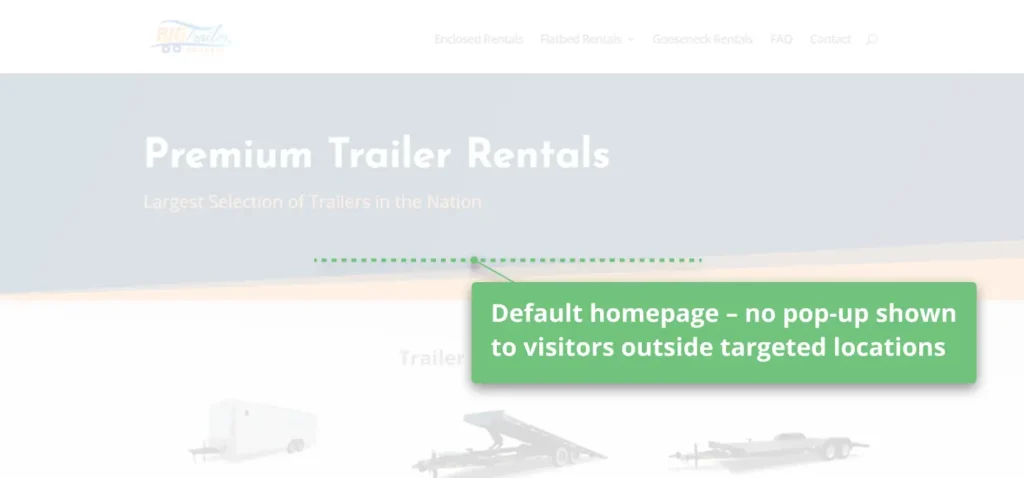
At the same time, visitors from non-targeted locations continue to browse the site without interruption, allowing them to explore the content and learn more about the available services.

default homepage big trailer rentals
Default homepage shown to visitors outside targeted locations

Case Study: Personalized headline based on the visitor’s first name

Company: Muskoka High Lands

Industry: Sport | muskokahighlands.com | Canada

Features Used: Query String DKI, UTM Parameters

At a glance

Muskoka High Lands s a golf club in Canada with an active member community and ongoing email campaigns.

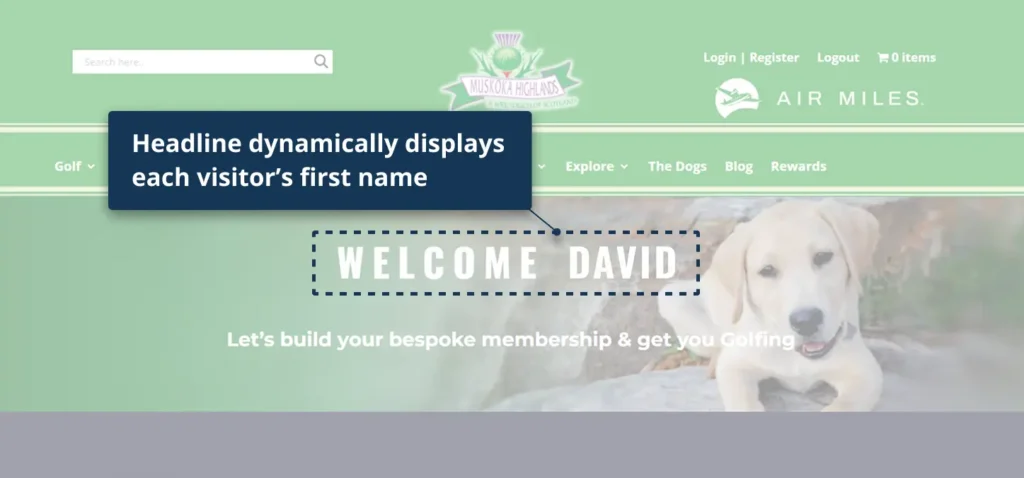
To create a more personal experience for visitors arriving from those campaigns, the homepage headline (H1) was dynamically updated with each visitor’s first name.

Dynamic Headline Muskoka Highlands
Headline displays visitor’s first name

The Challenge: Using existing member data to personalize the homepage headline

Since their campaign targeted existing members, they aimed to leverage the data already available to them and reflect it directly on the homepage – making the message more relevant and tailored to each visitor.

At the same time, the homepage serves a broader audience, including new visitors and those without identifiable data. The challenge was to personalize the headline for known visitors while ensuring all other visitors continue to see a clear and relevant default headline.

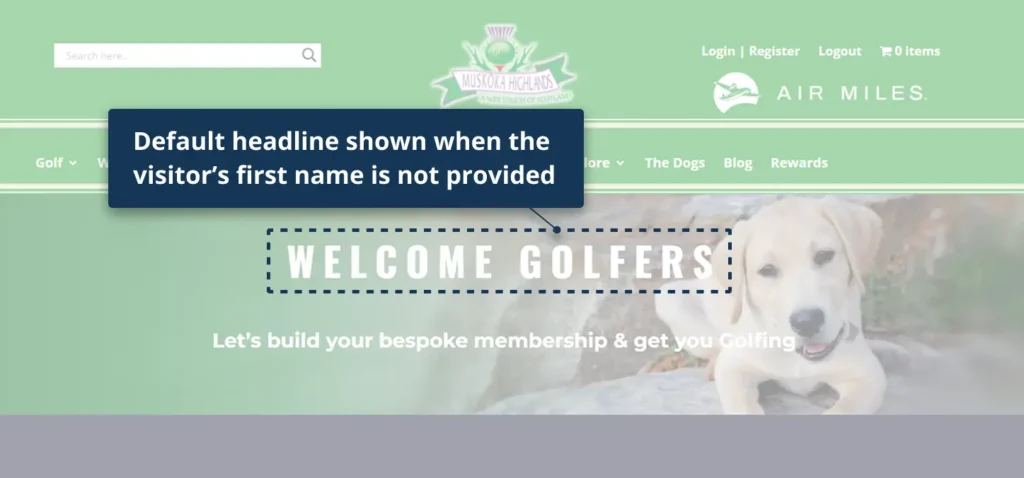
Default Headline
Default headline (no first name)

How Muskoka Highlands used If-So

Muskoka Highlands used If-So to create a dynamic headline that pulls the visitor’s first name from a URL parameter passed through their email campaign.

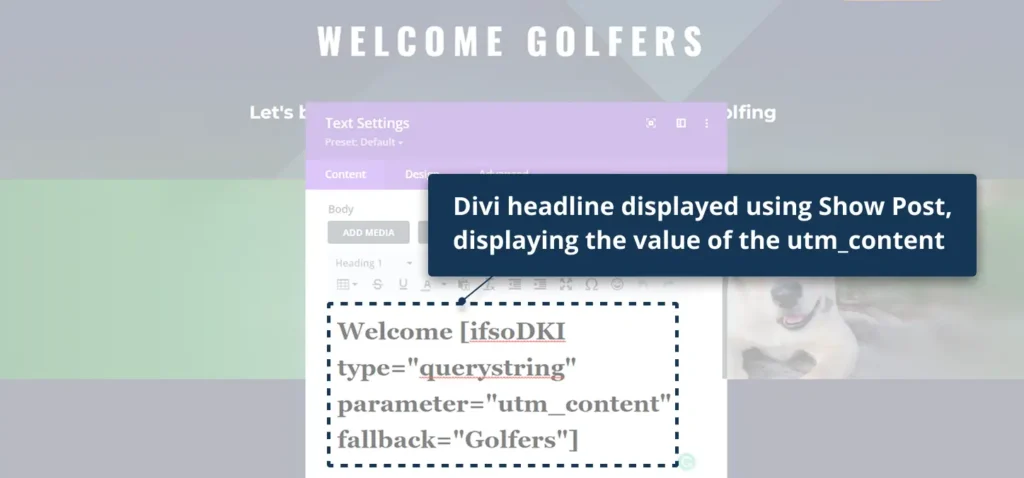
They implemented this using If-So’s Query String DKI, capturing the value of the utm_content parameter and displaying it directly inside the homepage headline (H1).

The headline was built in Divi and rendered using If-So’s Show Post shortcode, allowing the personalized value to appear inline within the existing headline.

If no name was available in the URL, a fallback value such as “Golfers” was displayed to keep the message clear and relevant.

divi headline setup muskoka highlands
Displaying the value of the utm content

The result

Visitors arriving from the email campaign were greeted with a personalized homepage headline that displayed their first name, creating a more relevant and engaging first impression.

This approach allowed Muskoka Highlands to leverage existing member data to increase relevance and engagement, while keeping the homepage clean and easy to manage – without requiring structural changes or multiple page versions.

Case Study: Smart Header – Displaying details based on user’s visits

Company: Direct Mortgage Loans

Industry: Financial Services | directmortgageloans.com | United States

Features Used: Page URL Condition

Agent details based on page URL condition
User visits an agent page → agent details appear in the header sitewide

The Challenge: A shared website for multiple agents

Direct Mortgage Loans is a mortgage company with a large network of agents, each driving traffic to their own page through referrals, business cards, and direct links.

Presenting the same generic experience to all visitors creates a disconnect. Once users leave the original agent page, the connection to that agent is lost, and the experience no longer reflects the source of the visit.

To create a more consistent experience, Direct Mortgage Loans set out to keep each visitor connected to the referring agent, ensuring that agent details and calls to action stay aligned throughout the user journey.

How Direct Mortgage Loans used If-So

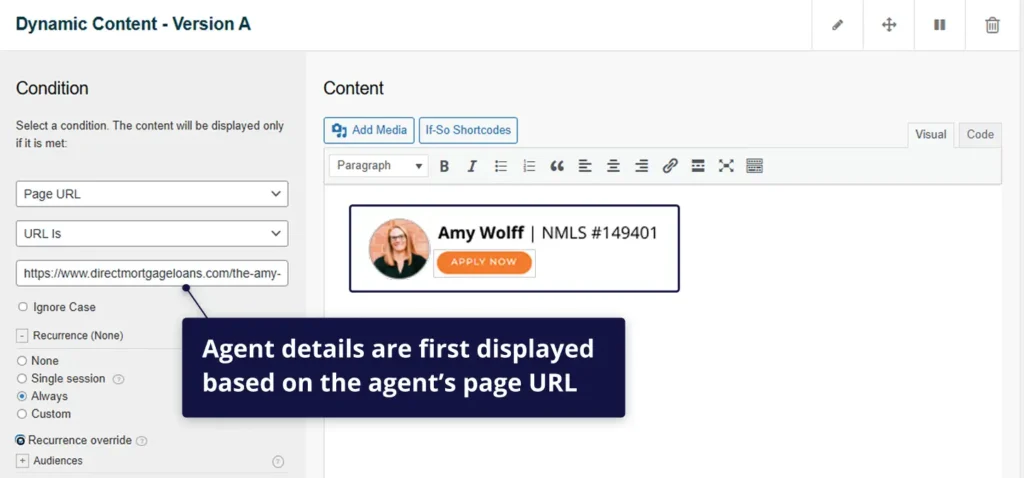
Direct Mortgage Loans used If-So to display agent-specific details in the website header based on the page a visitor arrives on. A Page URL condition was set for each agent page, so that when a visitor lands on a specific page, that agent’s details (such as name, photo, and call-to-action) appear in the header.

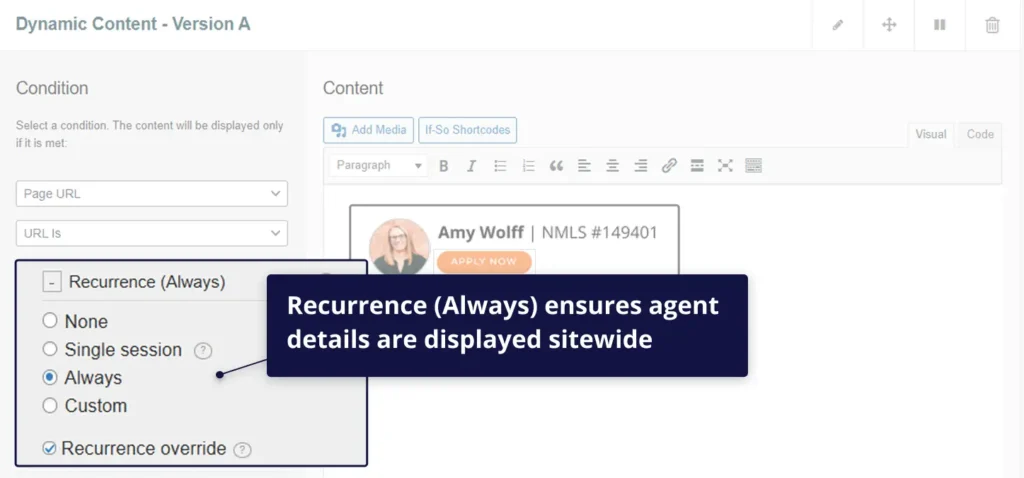
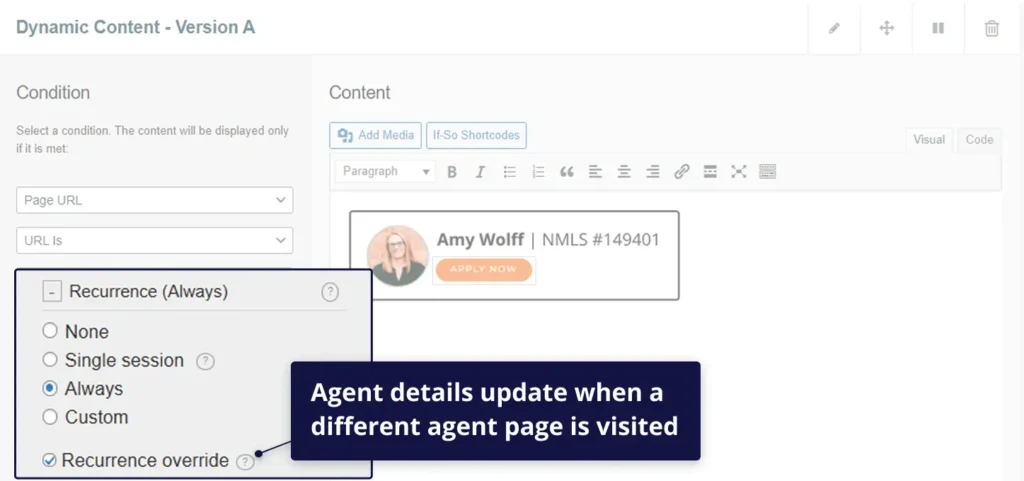
Recurrence was set to “Always,” ensuring that once an agent is identified, their details remain visible as the visitor navigates the site. Recurrence Override allows the header to update automatically if the visitor later visits a different agent page.

The page URL condition
Agent details are first displayed based on the agent’s page URL
Recurrence Always
Recurrence (Always) ensures agent details are displayed sitewide
Recurrence override
Agent details update when a different agent page is visited
Different agent details based on page URL condition
Agent details update when a different agent page is visited

Default view

When no specific agent page is visited, the website displays a default header with a general “Find an Agent” call-to-action.

The site structure remains the same, but without agent-specific details. Once a visitor lands on an agent page, the header updates to reflect that agent, shifting from a generic to an agent-driven experience.

Default CTA
By default, the “Find an agent” CTA appears in the header

The result

Instead of losing agent context after the first page visit, Direct Mortgage Loans now maintains a continuous connection between visitors and the referring agent. The website adapts the header based on each visitor’s journey, ensuring the right agent is consistently represented.

By keeping agent details visible and aligned with the user’s navigation, the site reinforces trust, reduces friction, and makes it easier for visitors to take action. This creates a smoother path from initial visit to conversion while preserving agent attribution across the session.

Using a dynamic header powered by page URL conditions, Direct Mortgage Loans delivers a more consistent experience, improving engagement and increasing the likelihood that visitors connect with the right agent.